D3 Organogram
D3.jsJavaScriptDjangoPostgreSQLPlaywright
Overview
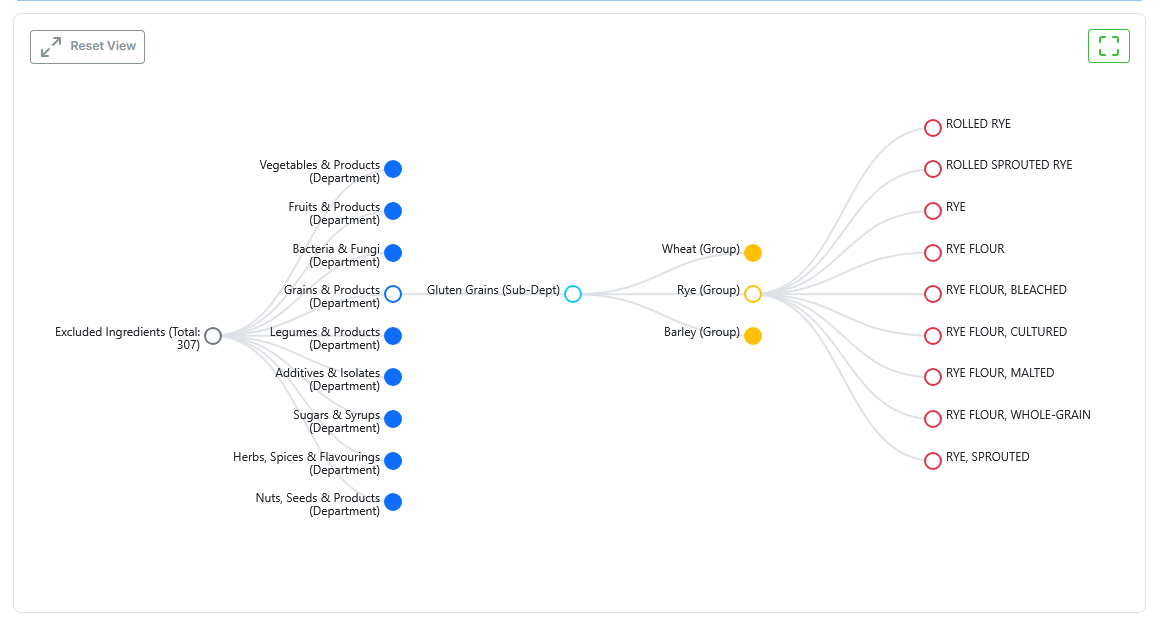
Part of Grocery Lens. The dietary filter system models ingredient taxonomy as a tree - a diet like Low-FODMAP is the root, its rules form the branches, and individual ingredients are leaves. This visualiser makes that structure navigable directly in the browser rather than through flat filter lists.
What I Built
- Collapsible D3 tree - nodes expand and collapse on click;
d3.hierarchystructures the data,d3.treecomputes positions, animated SVG transitions smooth the reflow - Zoom and pan - full
d3.zoomintegration; users can freely navigate large taxonomies without losing context; a reset button snaps back to the default view - Lazy loading - the tree only fetches data when the Tree View tab is activated, avoiding an unnecessary API call on page load
- Fullscreen mode - browser Fullscreen API toggled via a Feather icon button; the SVG reflows to fill the viewport
- Django REST endpoint - a dedicated view at
/api/diet/<diet_id>/ingredient-hierarchy/serialises the full ingredient subtree as nested JSON for a given diet template - End-to-end tests - Playwright + Django TestCase covering tab switching, tree rendering, lazy-load timing, fullscreen toggle, and API response shape
Technical Choices
- D3.js -
d3.hierarchy,d3.tree,d3.zoom; SVG<path>elements with cubic Bezier curves for links; enter/update/exit transitions for smooth node animations - Vanilla JS (
diet_tree_visualization.js) - no framework; the Django template embeds the serialised tree data and a single script initialises D3 against it - Bootstrap 5 - tabs, buttons, alerts, and layout scaffolding; CSS custom property theme variables used for colour consistency with the rest of the Django site
- Feather icons - tab icon, fullscreen toggle, and reset button; lightweight SVG sprite, no icon font dependency
- Playwright - end-to-end test suite validates the full user flow: tab click → API fetch → SVG render → fullscreen → collapse/expand